
Google Sheets fuzzy match
When Google Sheets isn't enough — and what to do about it.
Sheets is the universal tool. Nobody's leaving it. But its Remove Duplicates feature is exact-match only, the cell cap caps your real workload, and the 'fuzzy match' workarounds all have ceilings. Here's where each one breaks, and the cleanest path forward when it does.

Start with what Sheets is great at
Sheets is the universal tool. We're not asking you to leave it.
Universal collaboration
Everyone has Sheets. Real-time editing, comments, version history, shareable links — there's no replacement and we don't pretend to be one.
Quick exploration
For a 200-row list with two columns and a quick VLOOKUP against a master, Sheets is faster than any tool. We'd open Sheets too.
Free + ubiquitous
Part of every Workspace plan, plus a free personal tier. Pricing pressure doesn't exist for casual use.
The walls you'll hit
What Sheets fundamentally can't do for matching.
1. Remove Duplicates is exact-match only.
Data → Data cleanup → Remove duplicates compares whole rows or selected columns by exact string match — case-sensitive, whitespace-sensitive, formatting-sensitive. "John Smith" and "john smith" are not duplicates to it. Neither are "(617) 555-1234" and "617-555-1234". And it removes whole rows blindly — no review queue, no confidence scoring. Documented in Google's own help docs.
2. The 10-million-cell cap maps onto real CRM data fast.
Sheets caps at 10M cells per spreadsheet (Google opened a beta in April 2026 to double this to 20M for selected accounts — see Workspace Updates). Cells = rows × columns. A typical Salesforce contact export with 30 columns hits the cap at ~333,000 rows. A HubSpot export with 50 columns caps at 200,000. You can't "just open it" anymore.
3. There's no audit trail of what got matched and why.
Run Remove Duplicates and rows are gone. No log of which rows were merged into which, no confidence scores, no "show me the 50 rows we treated as duplicates so I can spot-check before they disappear." Version history helps a little but it's row-level, not cluster-level.
The three workarounds
How Sheets users try to do fuzzy matching today.
If you've Googled "google sheets fuzzy match" you've seen these three. None of them are wrong — but each has a clear ceiling. Knowing where the ceiling is saves you from building a workaround that breaks in three months.
Helper columns: LOWER, TRIM, REGEXREPLACE
Add a column with =LOWER(TRIM(REGEXREPLACE(A2, "[^a-zA-Z0-9@]", ""))) to normalize names/emails to a comparable form. Then run Remove Duplicates against the helper column. Catches case/whitespace/formatting variants but completely misses nickname matching (Bob/Robert), phonetic similarity (Smyth/ Smith), email aliases (john+work@ vs john@), and anything involving multiple weighted fields.
Ceiling: works for ~3,000 rows of casual data. Falls apart on multi-field weighted matching.
Third-party Workspace add-ons (Ablebits, Flookup, etc.)
The Workspace Marketplace has half a dozen "fuzzy match" add-ons. Find Fuzzy Matches by Ablebits is the most installed (72K+ users, ~3.5★ as of late 2024). They work for character-distance matching — typo correction in a few thousand rows. They're weaker on weighted multi-field matching, and using them means granting a third-party vendor read access to your spreadsheet data, which is a GDPR/privacy consideration for sensitive data.
Ceiling: works for typo-style matching at modest scale. Weaker on CRM-style dedup with multi-field weighted evidence; data leaves your control to the add-on vendor.
Custom Apps Script with Levenshtein/Jaro-Winkler
Write a Google Apps Script function that implements a string-distance algorithm and call it as a custom Sheets formula. Powerful — you can do real fuzzy matching this way. Also: you now own a code dependency, the script has execution timeouts (6 minutes per execution on free Workspace), and you're back to single-field matching unless you build the weighted-evidence math yourself (which is a real probabilistic record-linkage problem, not a weekend project).
Ceiling: works for one engineer who likes maintaining Apps Script. Doesn't scale across a team or past the script execution timeout.
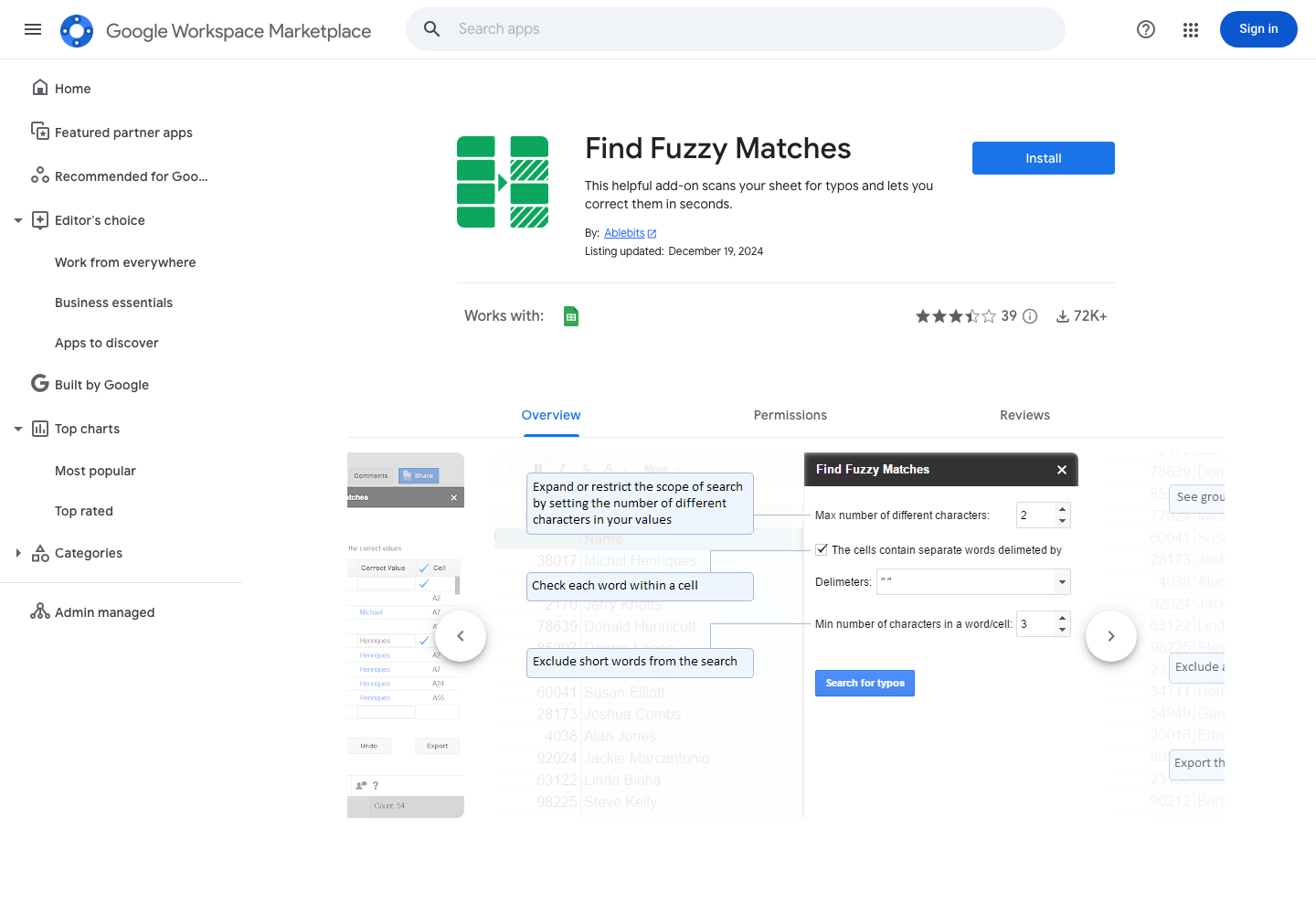
Even Google's own marketplace confirms it: doing fuzzy matching in Sheets requires installing a third-party add-on. Find Fuzzy Matches (by Ablebits) is the most popular at 72K+ installs.
Google Workspace Marketplace (accessed 2026-04-26)Same job, both tools
Dedup 50,000 contacts — Sheets workflow vs ListMatchGenie.
Concrete scenario: 50,000 contacts exported from your CRM, name + email + phone + company. Goal: find duplicates including nickname/typo/format variants. Here's what each path looks like.
In Google Sheets
- 1. Import CSV. If 50K × 30 columns = 1.5M cells, you're fine; double-check you're under the 10M cap.
- 2. Add 4 helper columns with LOWER/TRIM/REGEXREPLACE for name, email, phone, company. Wait while formulas evaluate.
- 3. Decide which add-on to install (Ablebits, Flookup, etc.). Grant it spreadsheet access. Configure character-distance thresholds.
- 4. Run the add-on's match. Wait. Get a flat list of suggested matches with no confidence score, no clustering, no "why" explanation.
- 5. Review row-by-row in a sidebar. No bulk-accept by pattern, no undo of accepted matches, no audit log of what you decided and why.
- 6. Export back to CSV. Hope you don't need to repeat this next month because nothing was saved.
Time estimate: 3–6 hours for a careful first run. 1–3 hours every time you repeat it.
In ListMatchGenie
- 1. Drag the CSV in. The Genie auto-detects schema and runs profiling on every column before you do anything.
- 2. Pick a match profile (CRM contacts, leads) or build a custom one weighted however you want.
- 3. Run match. Get a review queue with confidence scores, clustering by pattern, and a "why" explanation per cluster.
- 4. Bulk-accept high-confidence patterns; review low-confidence ones one at a time. Reversible at every step.
- 5. Export the cleaned file. Original columns preserved, plus match status, confidence, master-record ID, and an AI-generated narrative report.
- 6. Run it again next month — the match profile is saved.
Time estimate: 15–30 minutes for the first run. 5 minutes for re-runs.
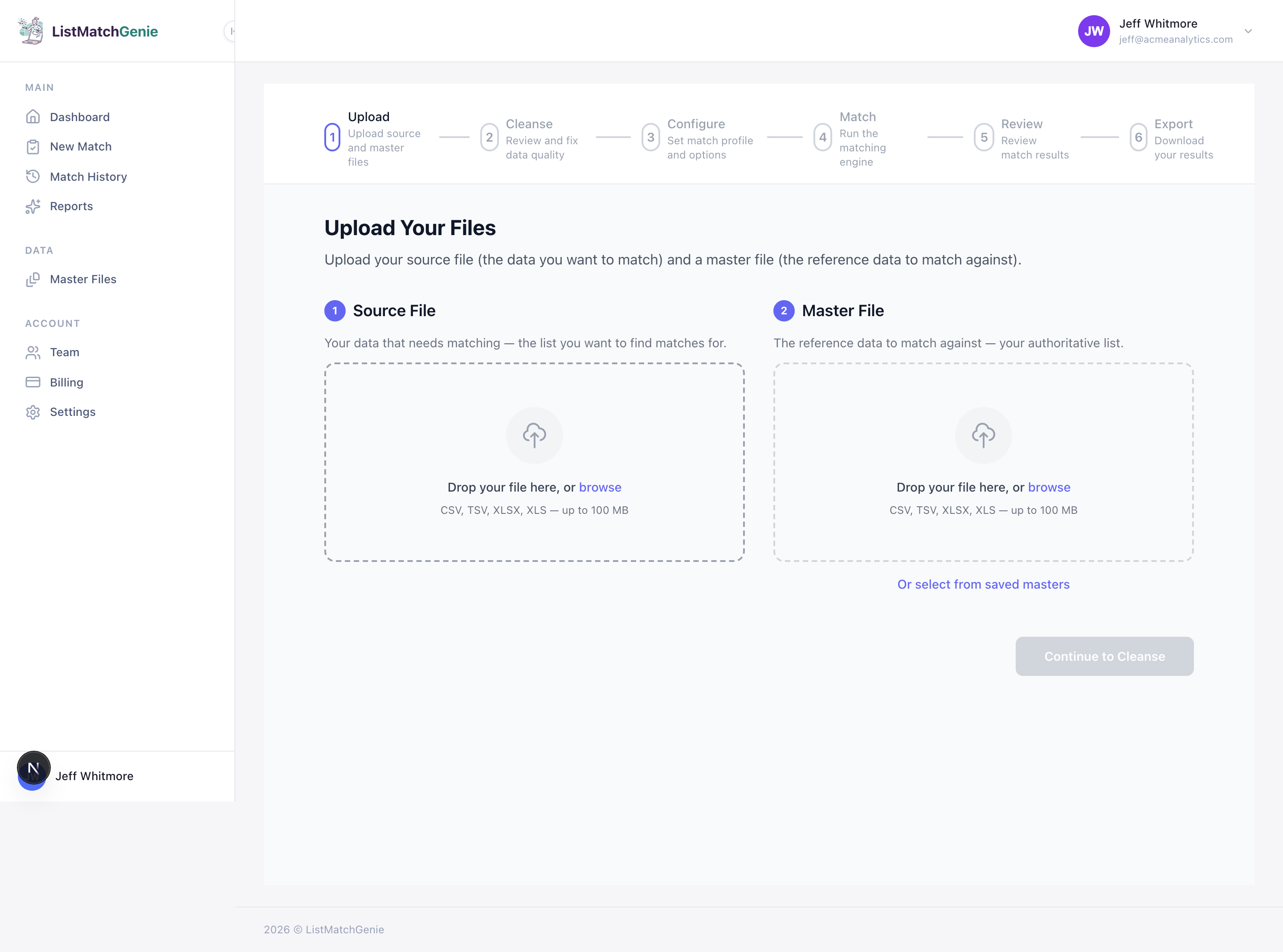
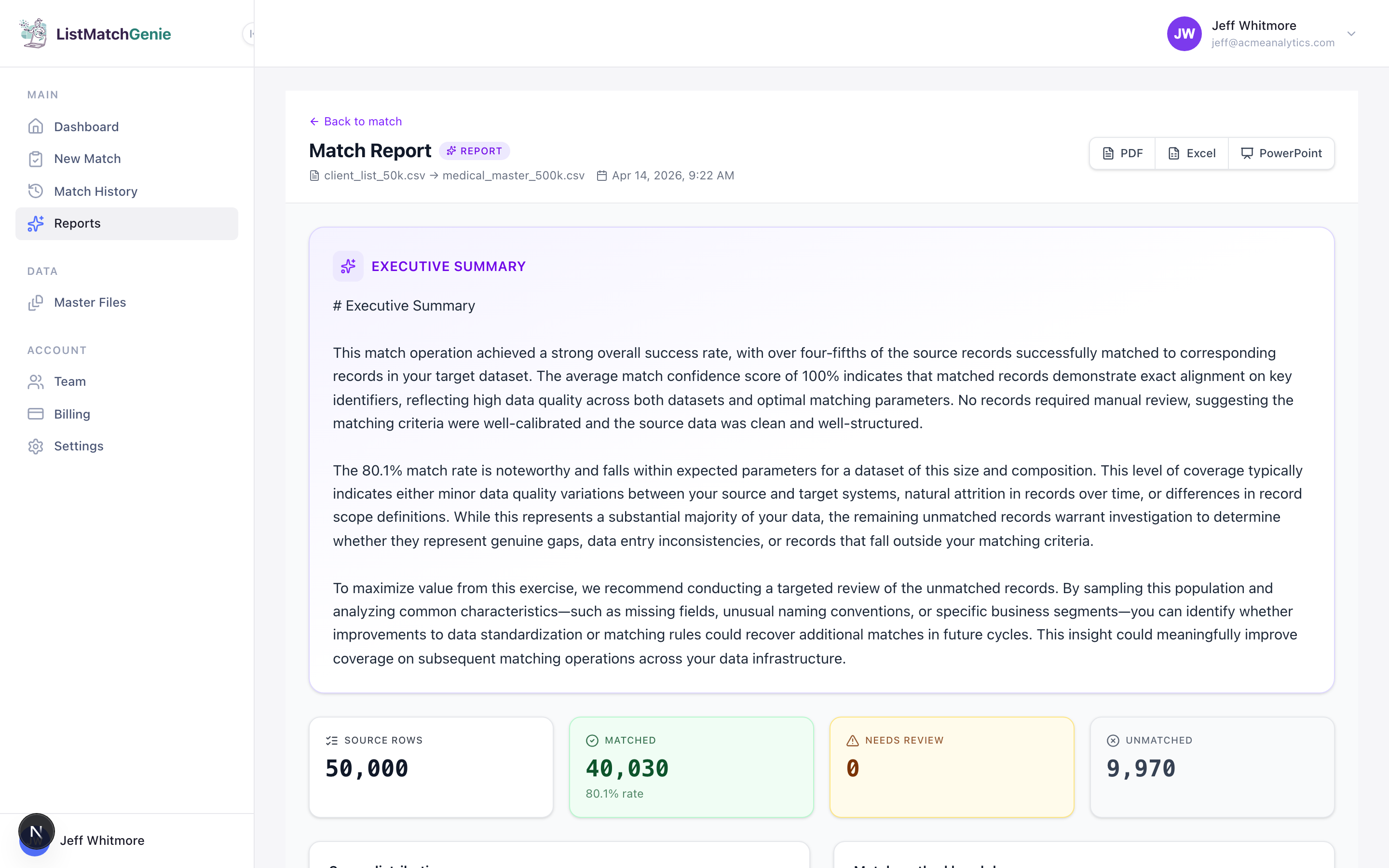
Capability comparison.
| Feature | ListMatchGenie | Google Sheets |
|---|---|---|
| Native fuzzy / probabilistic matching | Calibrated weighted evidence | Exact match only; add-on required |
| Multi-field weighted matching (name + email + phone) | Single-column at a time | |
| Nickname / phonetic / alias awareness | Robert↔Bob, Smyth↔Smith built in | |
| Confidence scores + 'why this matched' explanations | ||
| Review queue with bulk-accept by pattern | Row-by-row at best | |
| Practical row ceiling for matching workloads | 1M+ rows on Pro tier | 10M cells total → ~333K rows × 30 cols |
| Saved match profiles for re-runs | Rebuild formulas every time | |
| GDPR-aligned regional hosting | US / EU / UK regions | Workspace handles platform; add-ons share data with vendor |
When Sheets is the right call
Stay in Sheets if all of these are true.
Sheets is genuinely enough.
- Your dataset is under ~5,000 rows.
- Duplicates are mostly exact, with maybe a few obvious typos.
- You don't need to repeat the dedup process monthly or quarterly.
- You're matching on one or two columns, not weighted multi-field.
- The data isn't sensitive enough to need GDPR-region hosting or to forbid sharing with a third-party add-on vendor.
- You don't need a record of what got matched and why.
If all six are true, opening Sheets and adding a helper column is the right move. We'd do the same.
When to leave Sheets
The thresholds that mean it's time for a real matching tool.
If any one of these flips for you, Sheets is no longer the cheapest path — the time tax exceeds the cost of a purpose-built tool.
- Your dataset crosses ~10,000 rows or ~3M cells.
- You need to dedup or cross-match on 3+ fields together (name + email + phone, etc.).
- You're doing this monthly or quarterly and want to save the configuration.
- Stakeholders ask 'why did we treat these as duplicates' and you can't answer.
- You need to merge two lists from different systems (CRM + email tool, e.g.) — Sheets has no concept of source-vs-master matching.
- The data has GDPR/HIPAA exposure and you can't share it with an add-on vendor.
FAQ
Questions Sheets users actually Google.
Can Google Sheets do fuzzy matching natively?+
No. Google Sheets' built-in Remove Duplicates feature only matches exact values — and it removes whole rows. There's no native fuzzy/approximate matching, no nickname awareness, no email-alias handling. To do fuzzy matching in Sheets you need either complex helper formulas (LOWER, TRIM, REGEXREPLACE, then array comparison), a third-party Workspace add-on (Find Fuzzy Matches by Ablebits, Flookup, etc.), or custom Apps Script.
What's the row limit in Google Sheets in 2026?+
Sheets has a 10 million cell cap per spreadsheet (Google announced a beta program in April 2026 to double this to 20 million for selected accounts). Cells = rows × columns, so a sheet with 10 columns hits the cap at 1 million rows. A typical CRM export with 30 columns hits the cap at ~333,000 rows. ListMatchGenie tier limits run higher (1M rows on Pro, larger on Business) and don't share the cell-multiplied math.
Are the fuzzy match Sheets add-ons actually any good?+
They work for small datasets and simple cases. Find Fuzzy Matches by Ablebits is the most-installed (72,000+ installs on Workspace Marketplace, ~3.5/5 rating). It uses character-distance matching — fine for typo correction in a few thousand rows, weaker on real CRM dedup tasks where you're matching across name + email + phone + address with weighted evidence. They also have free tier limits and require sharing your sheet data with the add-on vendor — which may be a problem for sensitive data or GDPR.
When should I just stay in Sheets instead of moving to a dedup tool?+
Stay in Sheets if: (a) you have under ~5,000 rows, (b) duplicates are mostly exact or one-character typos, (c) you don't need to repeat the process monthly, (d) you only need email-only or name-only matching, and (e) the data isn't sensitive enough to need GDPR-aware hosting. If any one of those flips — leave Sheets.
Can I export from Google Sheets to ListMatchGenie?+
Yes. File → Download → CSV (.csv) gives you a clean export. Drag it into ListMatchGenie. The Genie will auto-detect schema, profile every column, and give you a review queue with confidence scores per cluster — much richer than what you can build in Sheets without weeks of formulas and Apps Script.
What does ListMatchGenie do that Sheets fundamentally can't?+
Probabilistic matching with calibrated weighted evidence (name + email + phone + address scored together, not just one column at a time), a review queue that lets you accept matches in pattern groups instead of row-by-row, automatic data profiling that flags malformed values before matching, multi-region GDPR-aligned hosting (US/EU/UK), AI-generated narrative reports, and exports that preserve your original columns plus match metadata. None of that is buildable in Sheets without significant custom code.
Let the Genie handle the grunt work.
Free tier is real. No card. No forms. Just upload your first list and see the Genie clean and match it in under a minute.